The task list menu
To access the task list menu, click on the 3 small dots to the right of the task list’s name:  A drop-down menu opens:
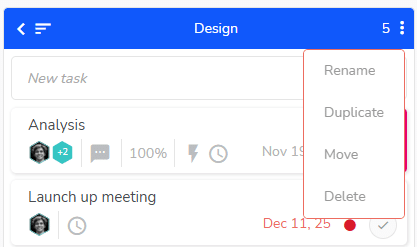
Actions allowed on a task list
- Rename: enter the new name for the list, and press “Enter” or click next to the list to validate.
- Duplicate: the copy will display the same name followed by a number You will then be able to change its name. Please notice that the copied tasks won’t include all the information from the original tasks (progress percentage and achived times won’t be duplicated). The features of the duplicate task list remains the same as other task lists and the two lists are completely independent.
- Move: by clicking on “Move”, a windows open allowing you to choose the destination project. In the What view of this project, the task list will be placed at the right of the existent task lists.
- Delete: confirm to finalize deletion or cancel if necessary. Warning: deletions are final and information cannot be retrieved.