To access the What view, select a project on the left column, then click on the What tab.
The view of the tasks by columns
This view allows you to list all the tasks to be performed and to organize them within task lists. This is a representation of the Kanban board.
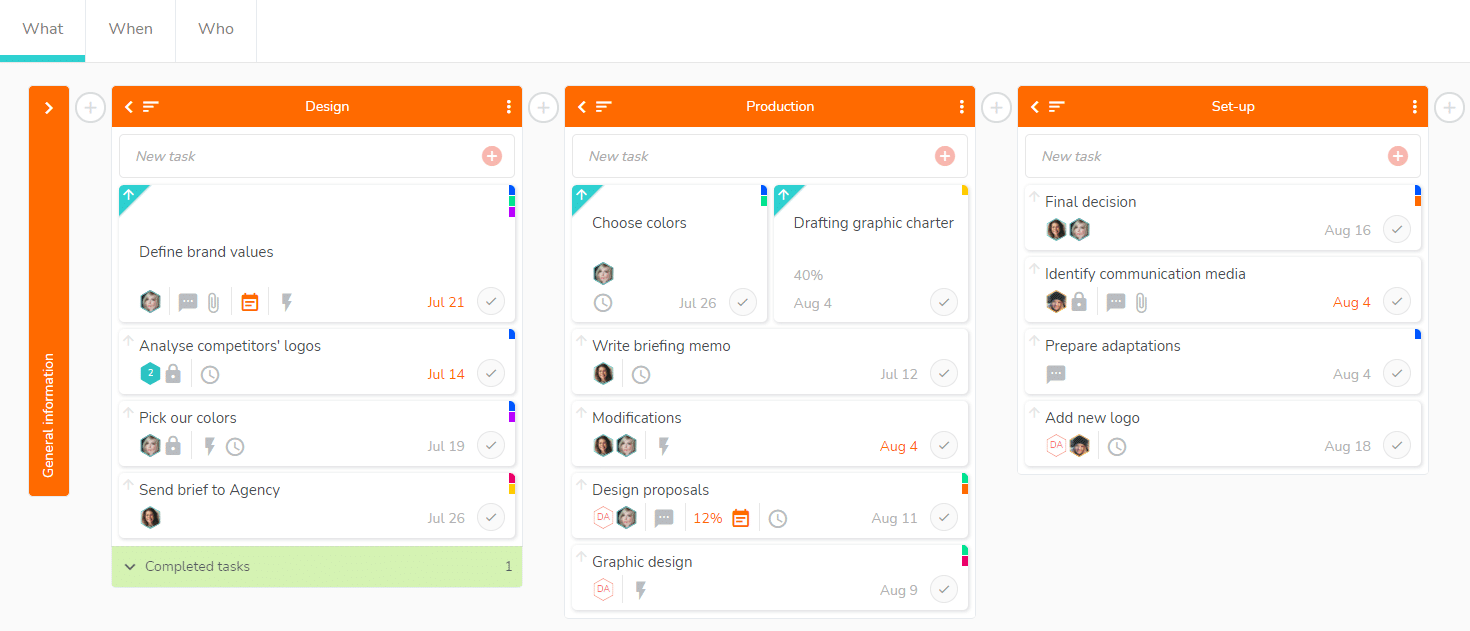
How to use the “What” view according to your needs?
You can perform several actions, as listed below.
- Create tasks and task lists: https://www.beesbusy.com/resources/features/tasks/create-task-list/
- Organize your task lists:
- Change the order of task lists by using drag and drop.
- Rename, duplicate or delete a task list: https://www.beesbusy.com/resources/features/tasks/rename-move-duplicate-delete-task-list/
- Minimize the display of a task list so as to optimize the screen space by clicking on the arrow to the left of the name of the list. Expand the list by clicking on the icon again.
- Organize and display your tasks:
- Move a task from one task list to another by using drag and drop.
- Display the detail of a task by clicking on it.
- Mark a task as completed: https://www.beesbusy.com/resources/features/tasks/progress-percentage-task/
- Set a task as a priority: https://www.beesbusy.com/resources/features/tasks/set-task-priority/
- Sort the tasks in a list by name, completion, start date, finish date, label, or member. This sort can be displayed in ascending or descending order according to your choice. Use the icon with three lines to the left of the task name to view options.

- Access completed tasks at the bottom of each list.
- Use the filters located at the top right to display only the needed tasks
 : https://www.beesbusy.com/resources/features/display/filters/
 - Access the project’s settings by clicking on the gear icon at the top right
 : https://www.beesbusy.com/resources/features/project/modify-project-settings/

 :
:  :
: