Where can you find the zoom?
You can to change the time scale (zoom in/out) on all the planning views, by project or in the multi-projects views.
How the zoom works?
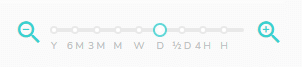
To change the time scale, click on the “Zoom” icons at the bottom right of each view mentioned above to zoom in or out.

You can also select the desired level by directly by adjusting the cursor or by positioning it directly on the displayed indicators (Y: year, 6M: half year, 3M: quarter, M: Month, W: week, D: day, ½ D: half-day, 4H: four hours, H: hour).
Good to know: the zoom level is maintained when you return to the view in question.