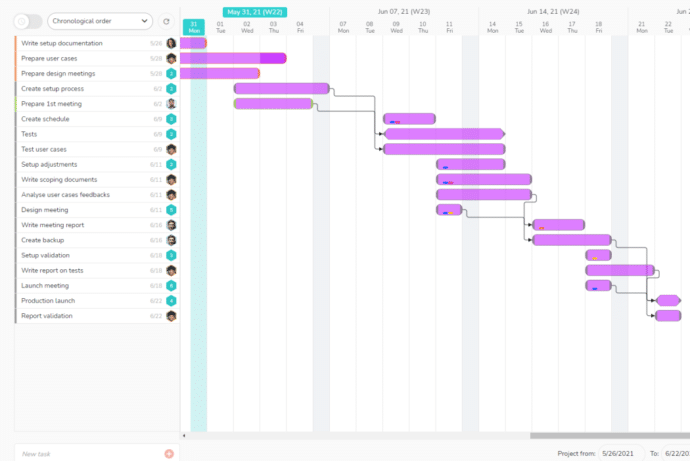
Plan tasks according to your team's workload and structure
Highlight key milestones to give your client visibility.
Easily adjust the schedule if there are any delays before signing.
Track progress, easily reschedule tasks based on their progress, and generate invoices based on time spent.
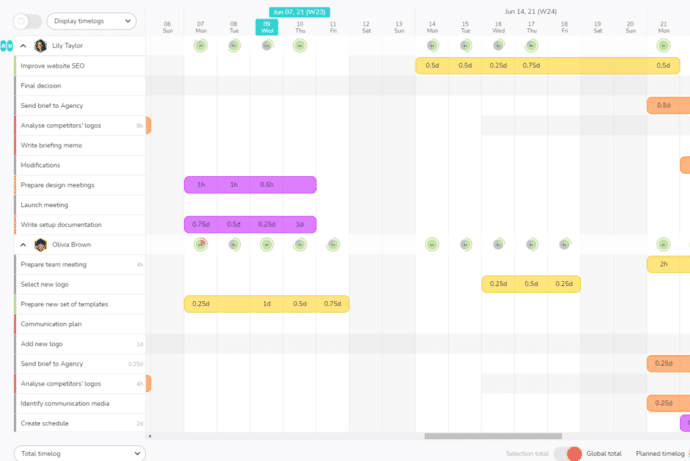
Staff your tasks according to the workload and the availability of your resources.
View daily, weekly, and monthly occupancy rates.
See your resource planning for each project in real time.
Make trade-offs and adjust workloads directly on the schedule.
Take advantage of discounted rates for your team!
-
1
-
5
-
10
-
20
-
50
-
100
-
200
-
500
-
+500
For any other number of licenses, please send us your request on the chat
FREE
Organization with task lists
Free
No credit card required- Unlimited projects
- Unlimited task lists
- Unlimited tasks
- Unlimited members and collaborations
- Unlimited custom notifications (Buzz)
- “What” view: organised into to-do lists
- Recurring tasks
- Priority tasks
- Reminder function
- Project classification
- Project archiving and deletion
- Duplicate tasks and projects
- Personal dashboard
- Calendar
- Creating labels
- Project filters
- By Member
- By Status
- By Label
- Create actions in tasks
- Search tool
- Automatic notifications
BUSINESS
Collaborative work and planning
Per month - billed annually
- All FREE features, plus:
- “When” view: Gantt chart
- “Who” view: team task planning
- The 3 multi-projects views: overall view of your projects
- Unlimited number of attachments: view your images in the “What” view
- Customised dashboard and statistics
- Connectors:
- Google calendar: synchronise Beesbusy tasks in your Google calendar
- Outlook calendar:
- Export Beesbusy tasks to your Outlook calendar
- Import your Outlook meetings in your Beesbusy agenda
- Excel import: import your data into Beesbusy (tasks and lists)
- Trello import: import your Trello tables as projects in Beesbusy (lists, cards and checklists)
- Presentation mode: optimized display mode for working in the best conditions
- Filters on multi-projects views
ENTERPRISE
Advanced project management
Per month - billed annually
- All BUSINESS features, plus:
- Time management: time recording and global vision
- Initial time
- Planned time
- Achieved time
- Remaining time
- Total time
- Task’s percentage completion
- Time tracking :
- Per member
- Per task
- Export to Excel
- Definition of working hours per member for the calculation of the occupancy rate
- Timelog view with real-time occupancy rate calculation
- Simulate occupancy rates: simulate members’ workloads in the short, medium and long term
- More agenda features:
- Enter time
- Enter unavailability and view occupancy rates
- Automatic imputation of timelogs according to the date of entry
- Global Dashboard for overall project management: management of all your projects in a synthetic view
- Customization of your workspace: your own logo and colors within the application
- Customization of your projects colors
- Add smart-tags on members: identify your members with smart-tags to add them in bulk and filter
- Special fields: create your own fields to qualify projects, tasks, times and members
- Fixed links: freeze the duration of the links on the Gantt chart
- PDF printing of project Gantt charts
- Budget management: manage the budget of your projects
- Initial budget
- Budget achieved
- Remaining budget
- Document database: overview of project attachments
- Connectors:
- Gitlab: generate Gitlab issues from your Beesbusy tasks
- Import Planner: import your Plans as projects in Beesbusy





























More than 80,000 users rely on Beesbusy

Customization
You have specific needs, we can make custom developments.

White-label
Add your logo and choose the colors of your workspace.

Online help
With online help and support at your service, your questions will not go unanswered.

Privacy policy
Your data is used only by us and is never resold.